


 |
||||||||||||||||||||||||||||
|
 |
Home |  |
|
|
Networking | |
|
|
Remote Access | |
|
|
Software | |
|
|
Security | |
|
|
Services | |
|
|
Support | |
|
|
|
|
|
|
|
|
|
|
|
|
|
|
|
|||||||||||||||
|
|
|
|
|
|
|
||||||||||||||||||||||
|
|
|
|
|
|
|
||||||||||||||||||||||
|
|
|
|||||||||||||||||||||||||||||||||||||||||||||||||||||||||||||||||||||||||||||||||||||||||||||||||||||||||||||||||||
|
|||||||||||||||||||||||||||||||||||||||||||||||||||||||||||||||||||||||||||||||||||||||||||||||||||||||||||||||||||||
|
|
|
|
|
|
|
|
|
|
| Keyserver Access for Biochemistry Department Computers This document describes how to connect to the Bioinformatics Resource Keyserver and is specific to Macintosh computers. Directions for Windows-based computers are available. The main instructions for downloading, installing and configuring Keyserver software are available at the CMGM Keyserver pages. |
||||
|
|
||||
 |
Logging On to the Keyserver | |||
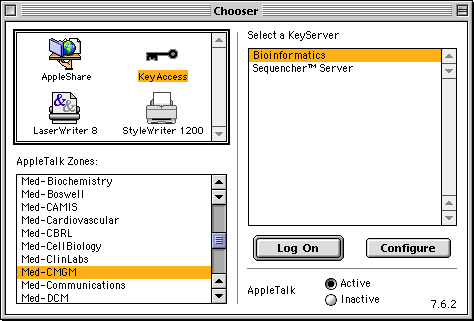
To log on to the Bioinformatics Keyserver, select "Chooser" from the apple menu: |
||||
 |
||||
| Select "KeyAccess" from the top left portion of the Chooser window, "Med-CMGM" from the AppleTalk Zones field, and "Bioinformatics" from the list of keyservers to the right. |
||||
|
|
If you do not have a KeyAccess icon in the Chooser, select this link to download a KeyAccess Installer for your computer. A CMGM Username and Password is required. You will still need to configure the KeyAccess program as described on this page. | |||
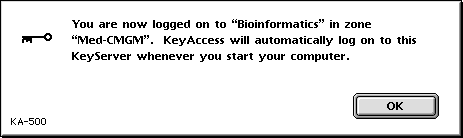
Press the "Log On" button: |
||||
 |
||||
| If you receive the message above your computer has successfully logged in to the Bioinformatics Keyserver. |
||||
|
Download Bioinformatics Keyserver software | |||
The migration from Biochemistry Keyserver to Bioinformatics Keyserver may render some software inoperable. Download new versions of the software at the Bioinformatics Keyserver Software link. |
||||
|
Last Updated: Monday, April 12, 1999 |
||||